
Buying guides
Can You Use a Vertical Mouse on a 3D Mousepad? Fit Checks
Compare your vertical mouse’s dimensions, side clearance and movement path with the selected 3D mousepad shape before deciding whether the setup fits.
Compare your vertical mouse’s dimensions, side clearance and movement path with the selected 3D mousepad shape before deciding whether the setup fits.
Start with the exact mouse and pad option
A vertical mouse label does not identify one universal shape. Check the model you actually use, including its handedness and any side projection, alongside the selected mousepad size and support style. This guide is a physical fit checklist, not a tested compatibility list or a health claim. If you already own the mouse, use it for your desk measurements. A product photograph showing another mouse cannot establish the clearance needed by yours.
Use manufacturer dimensions as an initial comparison
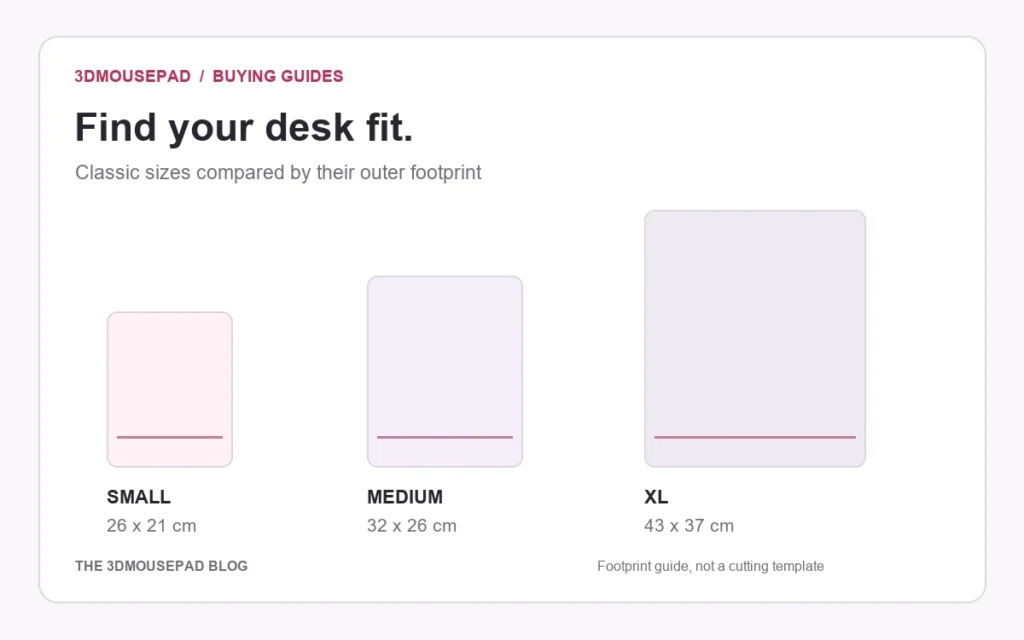
For a concrete example, Logitech’s Lift for Business data sheet lists dimensions of 71 mm high, 70 mm wide and 108 mm long. Those are the device’s overall dimensions, not a measurement of the area needed for your hand or mouse movements. Compare your own model’s current specifications rather than applying this example to every vertical mouse. Classic Small’s outer footprint is 26 cm long by 21 cm wide; see the mousepad size guide for other options.
Leave space beyond the resting footprint
In the simplified example, a 7 cm-wide mouse is narrower than a 21 cm-wide outer pad measurement. That alone does not establish 14 cm of usable sideways travel. The curved outline, raised support, starting position and the space your hand occupies all affect the arrangement. Check ordinary forward, backward and sideways movements with the keyboard in place. Keep the mouse on the intended flat movement area rather than treating the entire outer rectangle as a tracking surface.
Check the side nearest the raised support
Look at the gap between the mouse’s side or thumb area and the support while holding the mouse as you normally would. Check whether any part catches, pushes the mouse onto a curve or prevents the base from resting flat. Do not assume a larger overall pad automatically resolves a conflict with the support’s position or shape. If the combination requires you to force the mouse into an awkward path, reconsider the selected arrangement and ask about the exact option before buying.
Read height and shelf clearance correctly
The pad’s listed height is its maximum raised height, not the thickness of the flat mouse surface. Do not simply add that number to the mouse’s listed height: the mouse is intended to move on the flat area, not sit on top of the wrist support. Measure the actual arrangement if a shelf or tray is involved, including the clearance needed to remove the mouse. The keyboard-tray guide explains the additional checks for an enclosed space.
Resolve the remaining question before ordering
If you need help assessing a combination, send the store the mouse model, product link, chosen size and support style, plus the available desk or tray dimensions. Identify the concern as side clearance, movement space or height. These details support a more useful discussion than assuming all vertical mice need the same pad. Follow the mouse manufacturer’s instructions for the device itself, and confirm product-specific requirements before treating a desk sketch or digital preview as proof that the combination works.
Prepared by the 3DMousepad store team using our product specifications and published store guides. Product illustrations are not scale drawings. Check the product page for the current options, price and availability. Ask us about your setup or suggest a correction.
Keep exploring

3D Mousepad Sliding on Your Desk? A Simple Stability Check
Check the desk, underside, cable route and pad position when a 3D mousepad moves during use, using gentle care and a clear support checklist.
Choosing a 3D Mousepad for a Left-Handed Desk Setup
Check support position, usable desk space and mouse button settings before choosing a 3D mousepad for a left-handed setup.
HEIC Photo for a Custom Mousepad? Make an Accepted Upload Copy
Convert an HEIC photo into a genuine JPEG or PNG upload copy, then check its orientation, detail and size before using the custom mousepad studio.