
Buying guides
3D Mousepad Sizes in Inches: A Practical Conversion Guide
Compare classic and full-body mousepad dimensions in inches, with rounded conversions and a worked example for measuring your desk.
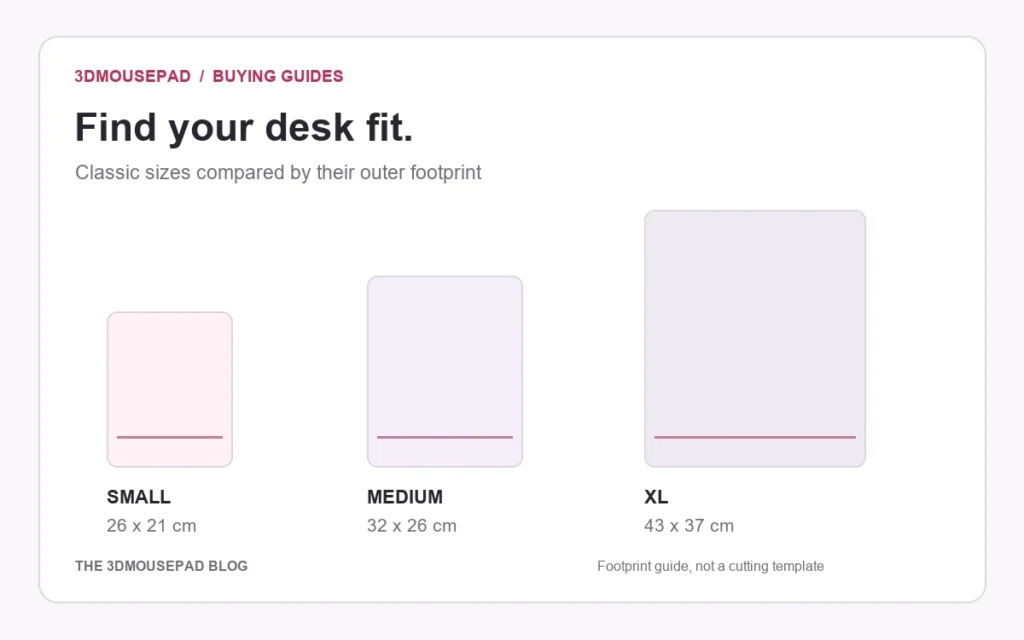
Compare classic and full-body mousepad dimensions in inches, with rounded conversions and a worked example for measuring your desk.
Convert each dimension separately
One inch equals 2.54 centimeters. Divide each centimeter measurement by 2.54. Our product dimensions use length, width and maximum raised height. The conversions below are rounded to two decimal places for comparison; they do not add a manufacturing tolerance or change the product specifications. Keep the original centimeter measurements beside your calculations when checking a close fit.
Read the classic sizes in inches
Small measures 26 × 21 × 2.8 cm, approximately 10.24 × 8.27 × 1.10 inches. Medium measures 32 × 26 × 3 cm, approximately 12.60 × 10.24 × 1.18 inches. XL measures 43 × 37 × 6 cm, approximately 16.93 × 14.57 × 2.36 inches. Small Chest has the same listed overall dimensions as Small Standard, with a different support style. Confirm the exact option in the current size guide.
Keep the full-body family separate
Full-body Small measures 41.5 × 21 × 3 cm, approximately 16.34 × 8.27 × 1.18 inches. Full-body Large measures 62 × 34.5 × 3.5 cm, approximately 24.41 × 13.58 × 1.38 inches. These longer silhouettes are a separate custom family. The Small label does not mean the same footprint as classic Small; compare measurements before choosing the family.
Work through an available-space example
Suppose the usable area beside your keyboard is 11 inches wide and 13 inches from front to back. Upright classic Medium needs about 10.24 inches side to side and 12.60 inches front to back. It fits numerically, but leaves only about 0.76 inches across the width and 0.40 inches along the length. This hypothetical comparison does not establish that the arrangement suits your mouse movements. Try marking the footprint on paper with your equipment in its normal position.
Check height and rounding
The listed height describes the highest raised area, not the thickness of the flat surface. A pad that fits the footprint may not fit under a shelf or inside a tray. Do not use rounding to justify squeezing it into an exact gap. Measure in centimeters as well when clearance is close, and ask about the selected option. Our keyboard tray guide explains those additional checks.
Confirm the product family before ordering
Write down the family, size and orientation beside your measurements. Compare them with the classic custom product or full-body custom product you intend to order. For artwork, review cropping at that selected size rather than reusing a layout checked for another shape. Contact the store if the measurements of a particular listing are unclear.
Prepared by the 3DMousepad store team using our product specifications and published store guides. Product illustrations are not scale drawings. Check the product page for the current options, price and availability. Ask us about your setup or suggest a correction.
Keep exploring
Tracking Created but No Movement? Check Your Mousepad Order Stage
Separate artwork approval, preparation and carrier tracking when checking a mousepad order that has no visible movement yet.
Will a 3D Mousepad Fit on Your Keyboard Tray?
Check usable width, front-to-back space and closing clearance before placing a raised mousepad on a keyboard tray or pull-out shelf.
Should You Mirror Your Custom Mousepad Artwork?
Upload artwork in the orientation you want customers to see, then check lettering and asymmetric details in the flat layout before approving the proof.